


Managing multiple accounts has never been just about opening a few more browser windows.
Whether you are running e-commerce stores, managing social media accounts, conducting market research, or operating business in different regions, each account may require a relatively stable and clean browser and network environment. This is why more and more teams are combiningfingerprint browsers with high-quality residential proxies。
For teams already using P1Browser, pairing it with a reliable residential proxy provider RolaProxy, which can further improve the account management environment:P1Browser handles independent browser Profiles, while RolaProxy handles residential IPs and geolocation.
P1Browser + RolaProxy: A Practical Combination for Multi-Account Management
The basic configuration logic is very simple:
P1Browser Profile → Independent Account
RolaProxy Residential Proxy → Network/IP Environment
Compared with multiple accounts sharing the same browser and network connection, you can configure independent browser Profiles and proxy environments for different accounts separately.
For example: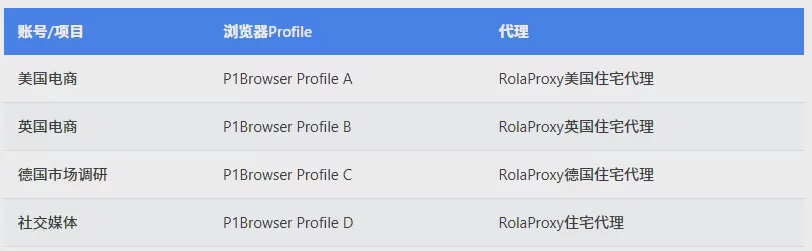
This configuration approach can help maintain clear management relationships across different projects, while also making it easier to maintain the working environments of different accounts.
For teams conducting global business, the proxy'sgeographic location selection capabilityis equally important.
Why is P1Browser a good fit with RolaProxy?
A fingerprint browser can help users isolate different browser Profiles, but it cannot by itself provide residential IP resources that meet the needs of different network environments.
This is exactly where RolaProxy comes into play.
RolaProxy provides1 hundred million+ residential IPs, covering 195+ countries and regions, and users can select the corresponding proxy location based on their target market.
For example, a company conducting U.S. market research can configure a U.S. residential proxy for the corresponding Profile in P1Browser; another Profile used for U.K. market research can use a U.K. residential IP.
In addition, RolaProxy also providesstatic ISP proxies, suitable for business scenarios that require a more stable, long-term use of the same IP environment.
If you want to test proxy quality before purchasing a larger plan, RolaProxy also offers a free trial, with residential proxy prices as low as$0.55/GB.
How to configure RolaProxy in P1Browser?
After creating a P1Browser browser Profile, connecting RolaProxy residential proxies to the corresponding Profile usually takes only a few steps.
First step: Create a P1Browser Profile
First, create separate Profiles for the accounts or projects you need to manage.
For example:
Profile A → Amazon US
Profile B → Shopify UK
Profile C → TikTok Shop Germany
Categorizing by account or project can make subsequent multi-account management clearer.
Step Two: Select RolaProxy Residential IP
Select the target country or region based on business needs.
RolaProxy covers 195+ countries and regions; you can choose:
- United States
- United Kingdom
- Germany
- France
- Canada
- Australia
- Japan
The specific region you choose depends on your target market and actual business needs.
Step Three: Add the proxy to the P1Browser Profile
Enter the proxy information provided by RolaProxy into the proxy settings of the corresponding P1Browser Profile.
You usually need to fill in:
- Proxy type
- Host
- Port
- Username
- Password
After saving the configuration, it is recommended to test the proxy connection and confirm whether the IP location is correct.
Step Four: Configure the corresponding proxy environment for each project
Once the proxy connection is working properly, you can keep the proxy permanently associated with the corresponding Profile.
For example:
P1Browser Profile A + RolaProxy US IP
P1Browser Profile B + RolaProxy UK IP
P1Browser Profile C + RolaProxy Germany IP
This way, you can clearly see which proxy corresponds to each account, reducing configuration errors when managing multiple projects.
How should proxies be selected for different business scenarios?
Not all projects require exactly the same proxy type.
E-commerce business
For e-commerce research scenarios such as Amazon, Shopify, and TikTok Shop, geographic location is usually important.
Residential proxies can help teams conduct market research from the corresponding regions.
For example:
P1Browser + RolaProxy US Residential Proxies
Suitable for US market research.
P1Browser + RolaProxy UK Residential Proxies
Suitable for UK market research.
Social Media
For multiple social media projects, you can create separate P1Browser Profiles for different accounts and configure the corresponding residential IPs based on actual business needs.
The key is to maintaina clear correspondence between Profiles, accounts, and proxies.
Market Research
This is one of the more common use cases for residential proxies.
Businesses can create separate P1Browser Profiles for different markets, and then configure RolaProxy residential IPs for the corresponding region for each Profile.
For example:
US market → US residential proxies
UK market → UK residential proxies
French market → French residential proxies
This helps researchers compare websites, product information, prices, and other market data across different regions.
Ad verification
Marketing teams can use residential IPs from different regions to check how websites, landing pages, or ad content appear in different markets.
You can create separate P1Browser Profile instances for different target regions and configure the corresponding RolaProxy proxies for them.
Residential proxies or static ISP proxies?
RolaProxy offers both residential proxies and Static ISP Proxy; which one to choose depends on project requirements.
Residential proxies
Better suited for:
- Market research
- Geo-targeted testing
- Web data collection
- E-commerce research
- Projects requiring flexible IP resources
Static ISP proxies
Better suited for:
- Long-running sessions
- Applications that require a fixed IP
- Businesses with high requirements for account environment stability
- Workflows that require long-term IP consistency
If your primary need isFlexible geographic location options, RolaProxy residential proxies are usually a suitable starting point.
If your business places more emphasis onlong-term stable IP environments, then you can consider RolaProxy Static ISP Proxy.
P1Browser + RolaProxy Usage Recommendations
A good configuration depends not only on the proxy itself, but also on how Profiles are managed.
The following practices can make daily management easier:
1. Clearly name Profiles
Use names such as Amazon-US, Shopify-UK, and Research-DE instead of simply using Profile 01 or Profile 02.
2. Keep proxy regions matched to projects
If a project primarily targets the US market, choose suitable US proxies instead of frequently switching randomly between different regions.
3. Avoid unnecessary configuration changes
After a Profile is configured, try to keep the environment stable, which is beneficial for long-term management.
4. Focus on proxy performance
If a proxy connection is unstable or unsuitable for the current business, replace it promptly rather than continuing to use a lower-quality connection.
5. Follow platform rules
Neither fingerprint browsers nor proxies can guarantee that an account will not be restricted by a platform. In actual use, you still need to comply with the target platform's terms of service and related policies.
Why is the P1Browser + RolaProxy combination more practical?
P1Browser and RolaProxy offer value in that they solve different problems within the same workflow.
P1Browser handles the browser-side environment.
RolaProxy handles the network-side environment.
In this way, the proxy is no longer just a simple network connection tool, but part of the entire account working environment.
For teams that need to manage multiple markets, accounts, or projects, this configuration approach makes unified management and scaling easier.
Summary
For businesses and teams already using P1Browser, if different accounts or projects require different geographic locations and network environments, pairing it with a reliable residential proxy is an option worth considering.
Byusing P1Browser to manage separate browser profiles, combined withRolaProxy's residential IP resources covering 195+ countries and regions, you can create a clearer working environment for e-commerce research, social media projects, market research, ad verification, and other international business operations.
RolaProxy provides1 hundred million+ residential IPs, coverage across 195+ countries and regions, residential proxies starting as low as $0.55/GB, static ISP proxies, and free trials.
If you are looking for residential proxies for P1Browser, you can first test the actual proxy quality through RolaProxy's free trial, and then choose the appropriate proxy plan based on your business needs.