



Many cross-border sellers encounter this situation: multiple stores have been operating for some time, and there are no obvious issues with their products, teams, or registration information, but the accounts suddenly receive platform association alerts, and this even affects subsequent operations.
After further investigation, it was found that although different accounts did not use the same information, they may have used similar device environments, browser environments, or network conditions over the long term.
This shows that in multi-account operations, when platforms determine account relationships, they do not only look at registration information; they may also perform a comprehensive analysis based on multiple dimensions such as device parameters, browser environments, Cookie data, and browser fingerprints.
Therefore, for cross-border sellers who need to manage multiple accounts simultaneously, how to establish a more independent account operating environment has become an increasingly important issue.
This is also why more and more cross-border sellers are starting to pay attention toanti-detect browser.
So, what exactly is an anti-detection browser? How is it different from a regular browser? And what factors should you pay attention to when choosing one?
Why might multiple accounts create a risk of being associated?
Many users believe that as long as the account details are different, they can completely avoid being linked.
But in reality, when identifying a user's environment, internet platforms usually analyze multiple dimensions of information.
Taking cross-border e-commerce platforms as an example, during an account login process, the platform may pay attention to:
- Login device information
- IP network environment
- Browser version
- Cookie data
- Browser fingerprint parameters
- User operation behavior
These pieces of information together make up an account's access environment.
For example, if multiple accounts log in on the same computer and in the same browser environment over a long period, they may share some device information and browser data.
Even if the account registration details are different, the platform may still determine that these accounts are highly similar.
Therefore, multi-account operations require managing not only the accounts themselves, but also the operating environment behind the accounts.
II. What Is an Anti-Association Browser?
An anti-association browser is a type of tool used to create independent browsing environments.
Its core function is to:
Help users establish mutually independent browser operating environments for different accounts.
A regular browser usually has only one fixed environment: browser configuration, Cookie data, cache information, and some device parameters all remain consistent.
When multiple accounts operate in the same environment over a long period, environmental associations may arise between the accounts.
In contrast, an anti-association browser can create multiple independent browsing environments, and each environment can have different:
- Cookie data
- Browser configuration
- Login status
- Environment parameters
- Usage records
Simply put:
Regular browser: one device corresponds to one primary browsing environment.
Anti-detect browser: one device can manage multiple mutually independent browsing environments.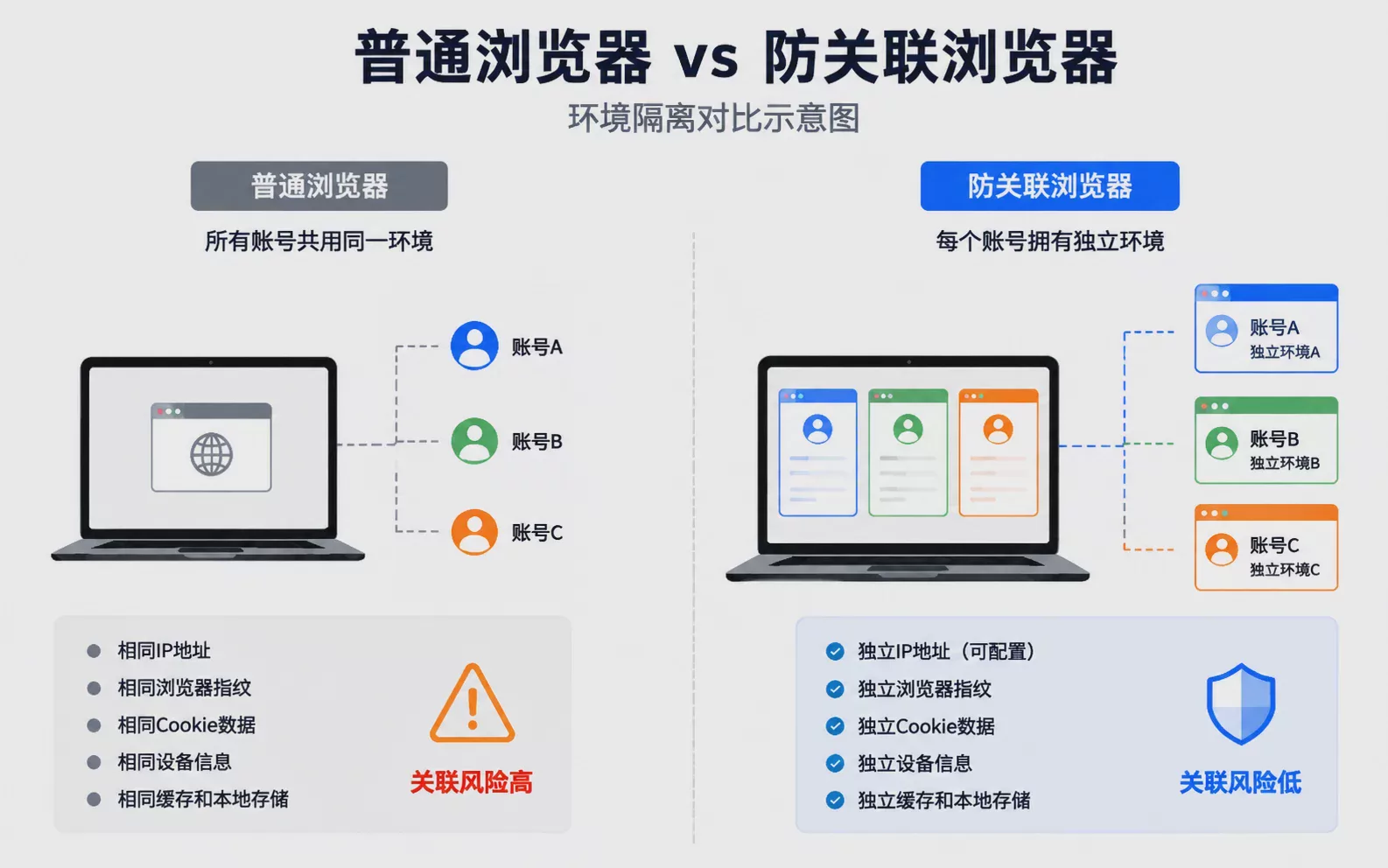
III. Core Technical Principles of Anti-Detect Browsers
An anti-detect browser is not simply about opening multiple browser windows.
The real core lies in: Browser environment isolation.
1. Browser fingerprint management
Browser fingerprinting is a technique websites use to identify a user's device environment.
It may include:
- User-Agent (browser and system information)
- Canvas parameters
- WebGL information
- Font information
- Screen resolution
- Time zone
- Language environment
- Hardware parameters
When these parameters are combined, they form a set of characteristic information about the device.
For the detailed principles of browser fingerprinting, you can refer to “How Browser Fingerprinting Works”
For example, Canvas fingerprinting: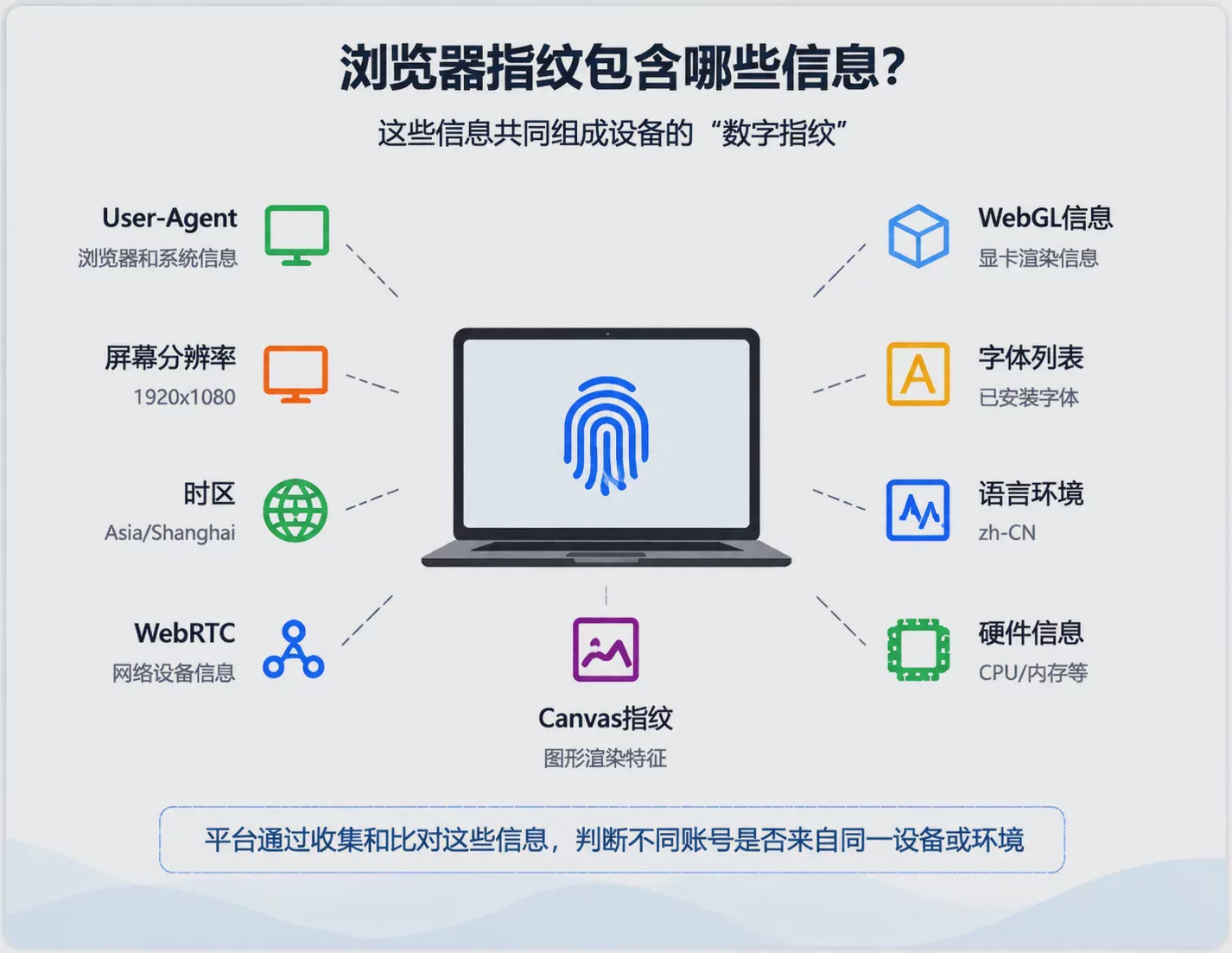
A website can have the browser perform specific graphic drawing and then read the final rendering result. Because different devices differ in graphics cards, drivers, and system environments, the final generated data may have subtle differences. When combined, these differences can serve as a reference for identifying the device environment.
WebGL fingerprinting works on a similar principle: it can distinguish different device environments by obtaining information related to the device's graphics processing.
Therefore, in multi-account operation scenarios, managing browser environment parameters becomes very important.
2. Cookie and Cache Isolation
Cookies record user login status and some access information.
For example, after a user logs in to account A, the browser will save the relevant Cookie data. If the same browser environment is later used to log in to account B, the two accounts may share some browser data.
Anti-detect browsers usually create independent data spaces for different environments, keeping Cookies, cache, and login status isolated between different accounts.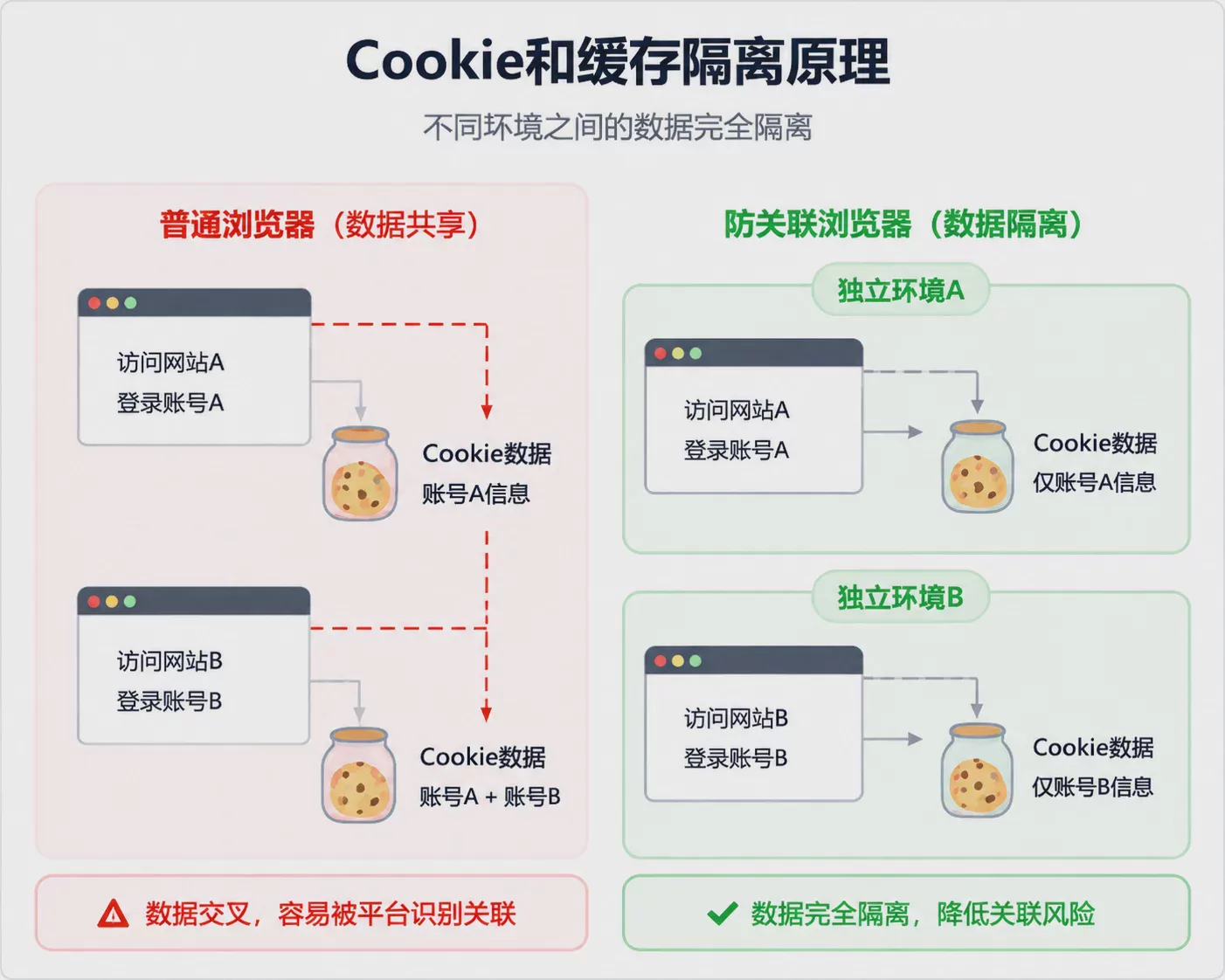
3. Multi-Environment Management Capabilities
For enterprise teams, simply creating multiple environments is not enough; they also need to consider:
- Environment Classification Management
- Member Permission Assignment
- Team Collaboration
- Data Storage
Therefore, an anti-detect browser is not just a browser tool, but also an environment management solution designed around multi-account operation scenarios.
IV. What scenarios are suitable for using an anti-detect browser?
Not all users need an anti-detect browser.
Generally speaking, as long as a business involves operating multiple accounts simultaneously, account environment management needs to be considered.
For example:
- Cross-border e-commerce multi-store operations
- Overseas social media account matrix
- Multi-client ad placement
- Overseas business team collaboration
As the number of accounts increases, how to ensure that different accounts have clear, independent operating environments will directly affect daily operational efficiency.
V. What factors should be considered when choosing an anti-detect browser?
There are currently many anti-detect browser products on the market, and their features and positioning also differ.
1. Richness of browser environment parameters
Basic tools may only support modifying some parameters, such as browser version, User-Agent, etc.
Mature solutions, however, usually support more environment configurations, such as:
- Canvas
- WebGL
- Fonts
- Time zone
- WebRTC
- Device parameters
2. Environment stability
Multi-account operations usually require long-term use, so you need to focus on environment saving capabilities, configuration stability, and long-term operating experience.
3. Team collaboration capabilities
When used by enterprise teams, you need to focus on:
- Multi-member operations
- Permission management
- Environment sharing
- Operation process management
4. Operating experience
An excellent tool should simultaneously provide complete functionality, simple operation, and low learning cost.
Common Misconceptions About Anti-Detect Browsers
Misconception 1: Changing the IP can solve all problems
IP is only one influencing factor; platforms may also make judgments based on multiple dimensions such as device information, browser fingerprints, Cookie, etc.
Misconception 2: Running multiple browser instances equals environment isolation
Multiple windows do not mean multiple independent environments. If the underlying browser parameters and Cookie data are still shared, environmental association may still exist between accounts.
Misconception 3: The more accounts, the more complex the operations.
As the number of accounts increases, standardized management becomes even more necessary. Managing separate environments can reduce manual switching errors and improve team operational efficiency.
Seven. Application of P1 fingerprint browser in multi-account management
At present, there are already quite a few browser environment management tools on the market designed for multi-account operation scenarios.
For exampleP1 fingerprint browser, which mainly targets users who need to manage multiple account environments. Through features such as browser environment isolation and account management, it helps users maintain different business accounts more conveniently.
For users such as cross-border e-commerce sellers and overseas marketing teams, choosing an environment management tool that suits their own business needs can improve account management efficiency.
Eight. Conclusion: What anti-association browsers solve is an environment management problem
The core value of an anti-association browser is not simply increasing the number of browsers.
What it solves is:
How to establish more independent, clear, and manageable browsing environments during multi-account operations.
If your business involves operating multiple accounts, you can first review your current situation: how many accounts there are, how many people are responsible for operating them, and whether the same device has been used to log in over the long term.
Once these basics are clear, you can then choose an appropriate account environment management solution based on your actual needs.
If you are currently operating multiple accounts, you can first learn about the environment isolation solution provided by P1 fingerprint browser, and then choose a suitable configuration based on your own account count and team needs.