



When the number of accounts grows from a few to dozens, many teams discover that the truly difficult part is not logging into accounts, but how to manage the browser environments corresponding to these accounts over the long term.
For multi-account businesses such as cross-border e-commerce, overseas social media operations, and ad placement, each account generates a large amount of browser data, including Cookie, login status, local storage, browser configuration, and device environment parameters.
If multiple accounts run in the same or disorganized browser environment over the long term, it not only increases team management costs, but may also increase the association risk caused by overlapping account environments.
When choosing a fingerprint browser, there are three core aspects to focus on:
- Environment isolation capability: whether the browsing environments of different accounts can be managed independently;
- Environment stability: Whether the environment remains reliable during long-term operation;
- Team collaboration capabilities: Whether it is easy to assign and maintain when multiple people operate.
In addition, browser kernel updates, product maintenance capabilities, and long-term usage costs are also important factors to consider when choosing a tool.
One, why does multi-account operation increasingly require environment management?
In the early days of account operation, one account typically corresponded to one computer, one browser, and one login environment. For individual users or users with a small number of accounts, this method could fully meet their needs.
As business grows, many teams begin to simultaneously operate multiple cross-border e-commerce stores, multiple overseas social media accounts, multiple advertising accounts, and business environments managed by multiple members.
At this point, the problem gradually changes—initially the focus was "how to log in to more accounts," and later it gradually became "how to manage the browser environments corresponding to different accounts over the long term."
Because each account generates its own environment data during operation:Cookie and login status, website data such as Local Storage, browser configuration, browser fingerprint-related parameters, and network environment information.
If these environments are not clearly managed, teams are prone to the following problems:
- Not knowing which environment corresponds to which account;
- Duplicate operations among team members;
- Inability to quickly restore after switching devices;
- Mixed environments among multiple accounts.
For long-term operations teams, establishing a clear browser environment management system has become an important part of account management.
II. Why Do Multi-Account Operations Need to Focus on Preventing Account Linkage?
Many users think account management is mainly about saving account passwords.
In fact, when identifying the access environment, platforms usually consider multiple factors comprehensively, including account information, network environment, browser data, device environment characteristics, and user operation behavior.
Cookies, cache, browser parameters, and device characteristics in the browser environment together constitute an account's daily operating environment.
Therefore, the key point in multi-account operations is not just "whether the account can be opened," but whether different accounts have clear, independent, and manageable operating environments.
A reasonable environment management approach can help teams reduce data crossover between different accounts and improve the standardization of multi-account operations.
It is important to note that no tool can replace compliant operations. For accounts to operate stably over the long term, they still need to be comprehensively managed by combining platform rules, business processes, and operational methods.
III. Why Is Chrome Profile Not Necessarily Suitable for Managing Large Numbers of Accounts?
For many users, Chrome Profile was the first multi-account management method they adopted.
Its advantages are obvious: it is free, easy to use, can store different cookies, and can distinguish different login states. For a small number of accounts, Chrome Profile can fully meet basic needs.
But as the number of accounts increases, problems gradually emerge.
1. Increased environment management costs
With a few accounts, you can distinguish them by name (for example, Amazon-US-01, Amazon-US-02). However, when the number of accounts grows to dozens or even more, you need to additionally maintain which Profile corresponds to which account, which team member is responsible for which environment, which environments are in use, and whether environment configurations have changed; management costs will continue to rise.
2. Profile mainly isolates data; it is not equivalent to complete environment management
Chrome Profile mainly addresses cookie isolation, browsing history isolation, and login state isolation. However, sharing still exists in the underlying browser environment, such as the operating system environment, browser kernel version, GPU-related parameters, Canvas/WebGL rendering characteristics, and system font environment. Therefore, Chrome Profile is more suitable for simple data isolation, while professional environment management tools focus more on the creation, maintenance, and management of complete browser environments.
When the number of accounts reaches a certain scale, many teams upgrade from Chrome Profile management to professional environment management tools, such as P1 fingerprint browser.
What capabilities should you focus on when choosing a fingerprint browser?
When many users choose a fingerprint browser, they first focus on how many environments can be created, how many accounts are supported, and how much the software costs.
These factors are certainly important, but for long-term operations, you should focus more on the following aspects.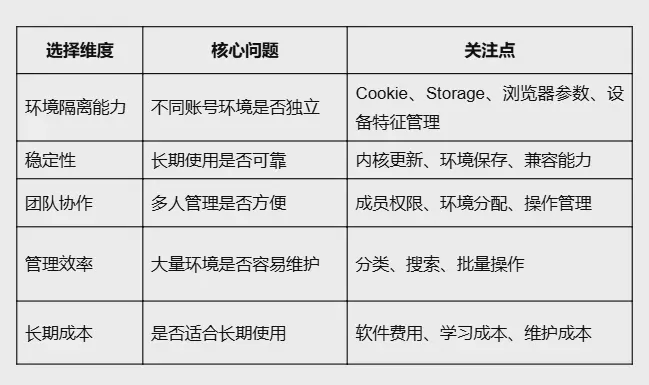
V. How Does the P1 Fingerprint Browser Help Manage Multi-Account Environments?
The P1 fingerprint browser is mainly designed for multi-account operation scenarios. Through independent browsing environment creation, environment parameter management, and team collaboration capabilities, it helps users establish a more standardized account environment management process.
1. Independent Browsing Environment Management
Different accounts can correspond to different browsing environments. Users can create independent environments based on business needs and manage login data, browser configurations, environment parameters, and usage permissions by category. This reduces data confusion between different accounts and establishes a clear correspondence between accounts and environments.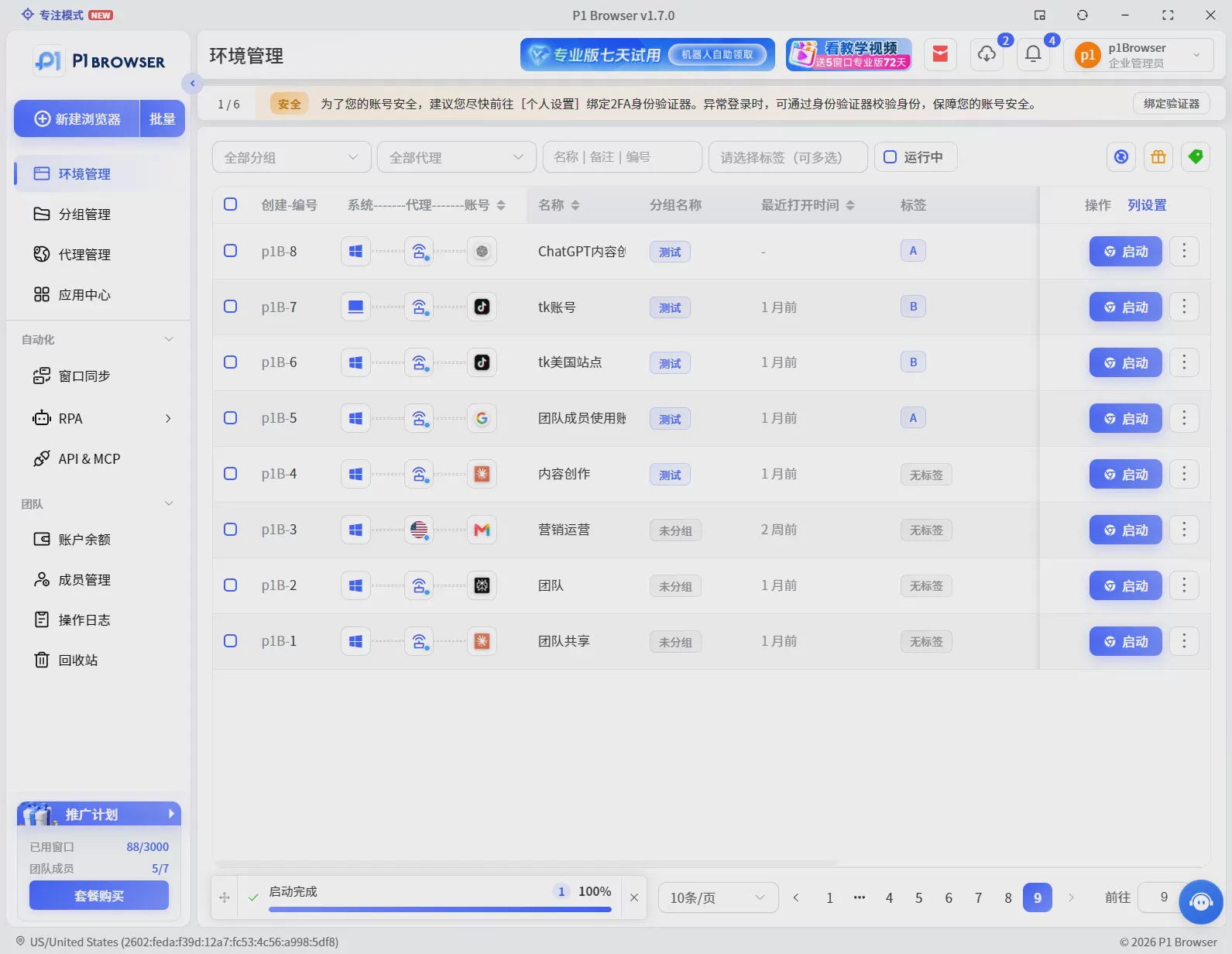
2. Environment Parameter Management to Reduce Environment Crossover
In the process of multi-account operations, browser environment parameters are also an important part that requires attention. P1 supports the management of browser environment-related parameters, including User-Agent, language settings, time zone configuration, Canvas/WebGL-related environment parameters, and browser configuration, helping teams establish a clearer environment management system.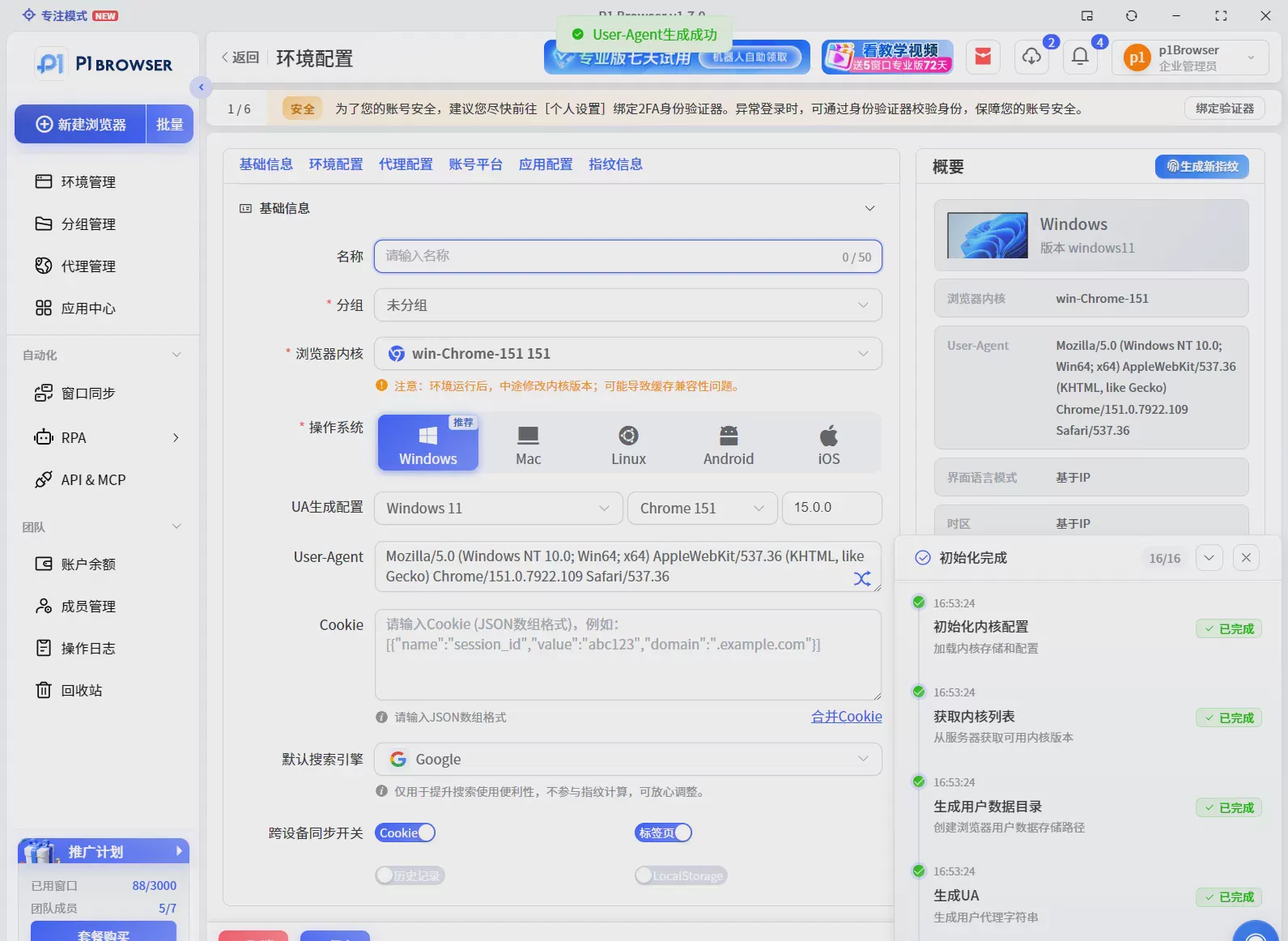
3. Multi-User Collaboration to Improve Team Management Efficiency
As the number of accounts increases, the biggest challenge is not creating environments, but managing them. P1 supports environment categorization, member management, permission assignment, and team collaboration, allowing different members to manage the corresponding environments according to their business roles, reducing communication costs and operational errors.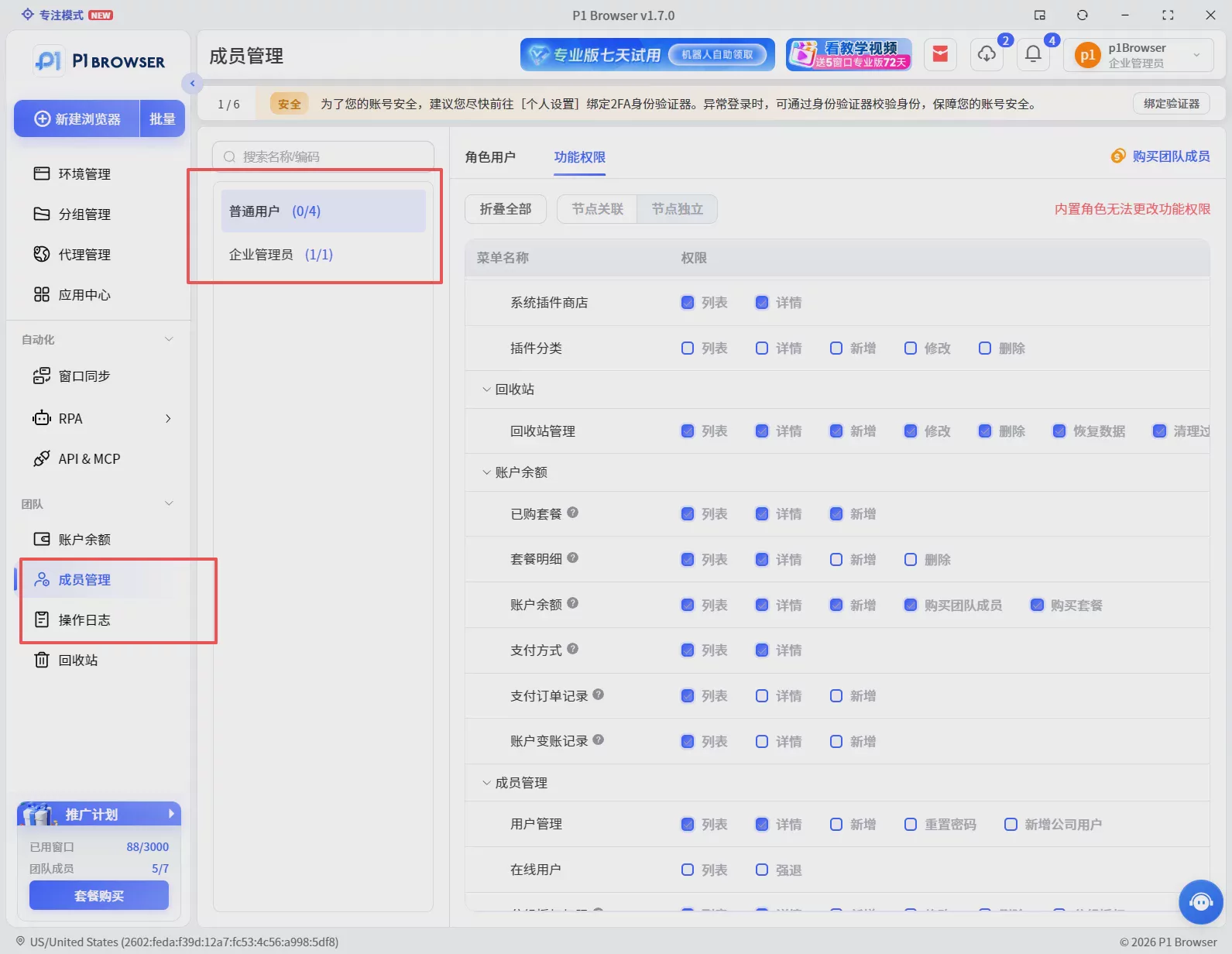
Six. How Should Teams of Different Sizes Choose?
Not all users need professional environment management tools.
Individual Users
If you only have a small number of accounts and operate alone, a regular browser may already meet your needs. Focus on ease of use, convenient environment management, and controllable costs.
Small Teams
If you begin collaborating with multiple people, you need to focus on environment allocation, account mapping, and basic permission management.
Medium and Large Teams
As the number of accounts continues to grow, you need to focus on batch environment management, member permission control, long-term maintenance efficiency, and product stability. For these teams, the value of the tool is not only in creating more browser environments, but more importantly in establishing standardized management processes.
Seven. Don't choose a fingerprint browser based only on price
Different products vary in functional design and applicable scenarios. When choosing, it is recommended to consider the following aspects.
Current needs
How many accounts need to be managed at present? Will the number of accounts grow in the next six months or one year? Are multiple platforms operated simultaneously? These will all affect tool selection.
Team size
Is it individual operation or multi-person collaboration? Is permission management required? Do environments need to be maintained in a unified way? The larger the team size, the higher the requirements for management capabilities.
Long-term usage costs
In addition to the software price, you also need to consider learning costs, management costs, product maintenance capabilities, and technical support capabilities. A stable, easy-to-manage environment tool can reduce operational complexity in the long term.
Summary
With the development of cross-border e-commerce and overseas business, multi-account operations have become an increasingly common model. From initially managing account passwords to later managing complete browser environments, this is a change that many teams go through.
Chrome Profile can meet basic account categorization needs, but when the number of accounts increases and teams begin collaborative operations, relying only on browser Profile may be difficult to meet long-term management needs. The core value of a fingerprint browser is not just creating multiple browser windows, but helping teams build a clearer, more independent, and more maintainable browser environment management system.
P1 Fingerprint BrowserThrough independent environment creation, browser parameter management, and team collaboration capabilities, it helps multi-account operation teams reduce environment management complexity and improve overall operational efficiency. If you are moving from single-account operation to multi-account and multi-team collaboration, you can start by sorting out the current mapping between accounts and environments, then gradually introduce professional environment management tools to establish a standardized multi-account management system.
Frequently Asked Questions (FAQ)
What is the difference between a fingerprint browser and a Chrome Profile?
Chrome Profile mainly addresses browser data isolation issues such as cookies and login status, while a fingerprint browser further focuses on browser environment parameter management, team collaboration, and maintenance of a large number of environments. For a small number of accounts, using Chrome Profile is sufficient, but as the number of accounts increases, the advantages of professional environment management tools become more obvious.
Can a fingerprint browser prevent account association?
A fingerprint browser is mainly used to help users create independent browsing environments and reduce environment overlap between different accounts. However, stable account operation also requires comprehensive management in combination with platform rules, network environments, business information, and operational methods. No tool can replace compliant operations.
What scenarios is the P1 fingerprint browser suitable for?
It is mainly suitable for scenarios that require multiple independent browsing environments, such as cross-border e-commerce multi-store management, overseas social media account operations, advertising account management, and multi-member team collaboration.
Are more fingerprint browser environments always better?
The number of environments is only a basic metric. For long-term operations, what matters more is environment stability, management efficiency, and team collaboration capabilities. Products that can create a large number of environments but lack sufficient stability will instead increase maintenance costs in long-term use. It is recommended to prioritize environment quality and comprehensive management capabilities based on your own account scale and team needs.