


In scenarios such as cross-border e-commerce, overseas social media operations, and ad testing, proxy IPs have become an important tool for many teams to carry out overseas business.
However, many users encounter similar problems when using proxies: the proxy IP can connect normally, yet the account frequently triggers verification; the IP shows as being in the target country, but the platform still reports an abnormal environment.
The root cause of these problems is often not whether the proxy "can be used," but whether this proxy IP meets the conditions for long-term stable use.
This article will introduce what proxy IP purity is, how to detect proxy IP quality, and why relying solely on proxy IPs is not enough—you also need to work with a fingerprint browser to build a complete account environment.
What Is Proxy IP Purity?
Proxy IP purity, simply put, is a metric for determining whether an IP address has a stable, trustworthy network environment.
A high-quality proxy IP usually has the following characteristics:
- The IP history is normal, with no obvious risky behavior;
- The IP location is consistent with the target market;
- The network type meets usage requirements;
- There are no obvious proxy nodes or abnormal access records.
It should be noted that IP purity is not an absolute standard.
For the same IP, risk assessments may be completely different under different business scenarios.
For example:
- A data center IP suitable for web browsing may not be suitable for long-term Amazon account operation;
- A proxy suitable for data collection is not necessarily suitable for social media account management.
Therefore, when choosing a proxy IP, you cannot only look at "whether it can be accessed"; you also need to make a judgment based on the actual business scenario.
II. What risks can poor proxy IP quality bring?
Many users believe:
"As long as the proxy IP can access the target website, it means there is no problem with the proxy."
In fact, for overseas platform account operations, platforms consider multiple factors when assessing the environment.
1. IP history affects account stability
Some proxy IPs may have been used by a large number of users in the past. If, in the past, there was:
- bulk registration;
- abnormal access;
- sending spam;
- frequent account switching;
These behaviors may cause risk records to be left on the IP. Even if the current IP can access normally, it may still affect subsequent account operations.
2. Inaccurate IP location leads to an abnormal environment
Many overseas businesses need to match the target market environment. For example:
- US Amazon accounts need to use a US network environment in a stable manner;
- UK YouTube accounts need to maintain UK-region access characteristics.
If a proxy shows a US IP, but the actual carrier, ASN information, or network type has obvious anomalies, it may cause the platform to re-evaluate the current environment.
3. IP Type Is Not Suitable for Business Needs
Currently, common proxy types mainly include: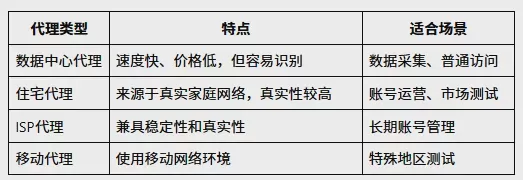
For account operation scenarios such as Amazon, YouTube, and TikTok, greater attention is usually paid to IP stability and authenticity, so residential proxies or ISP proxies are often more suitable.
III. How to Detect Proxy IP Quality? 4 Steps to Determine Whether an IP Is Reliable
After selecting a proxy, it is not recommended to use it directly on accounts. The following steps can help you determine in advance whether the proxy IP meets your needs.
First step: Check basic IP information
First, you need to confirm the basic information of the proxy IP. Common detection items include:
- Country and region;
- City location;
- ASN information;
- ISP;
- Network type.
Common tools:
- IPinfo
- WhatIsMyIP

- IP138

For example, after purchasing a US residential proxy, you can use an IP lookup tool to confirm:
- Whether the IP actually belongs to the United States;
- Whether the associated ISP matches residential network characteristics;
- Whether it shows obvious data center proxy information.
If the test results do not match the purchase information, use it with caution.
Second Step: Check IP Risk Score and Blacklist Records
The fact that an IP can access websites does not mean it is risk-free. Many proxy IPs may already have been recorded in risk databases.
You can check with the following tools:
- Scamalytics

- IPQualityScore (IPQS)
Key items to check:
- Fraud Score (risk score);
- Whether it is flagged as a VPN;
- Whether there is any proxy history;
- Whether it has been blacklisted.
If an IP shows high risk on multiple detection platforms, has a large volume of abnormal historical records, or is flagged as a proxy node, it is not recommended for long-term account operation.
Third step: Check for DNS and WebRTC leaks
Many users believe: "Changing the proxy IP is equivalent to hiding the real environment." However, other factors in the browser environment may also expose real network information. The more common ones are DNS leaks and WebRTC leaks.
What is a DNS leak?
Normally, when users visit a website, the domain name needs to be resolved through a DNS server. If the proxy has already been switched, but DNS requests are still sent through the local network, the real network location may be exposed.
What is a WebRTC leak?
WebRTC is a real-time communication technology in browsers. In some cases, even when a proxy is used, the browser may still obtain the real IP address through WebRTC.
Detection tool: BrowserLeaks WebRTC Test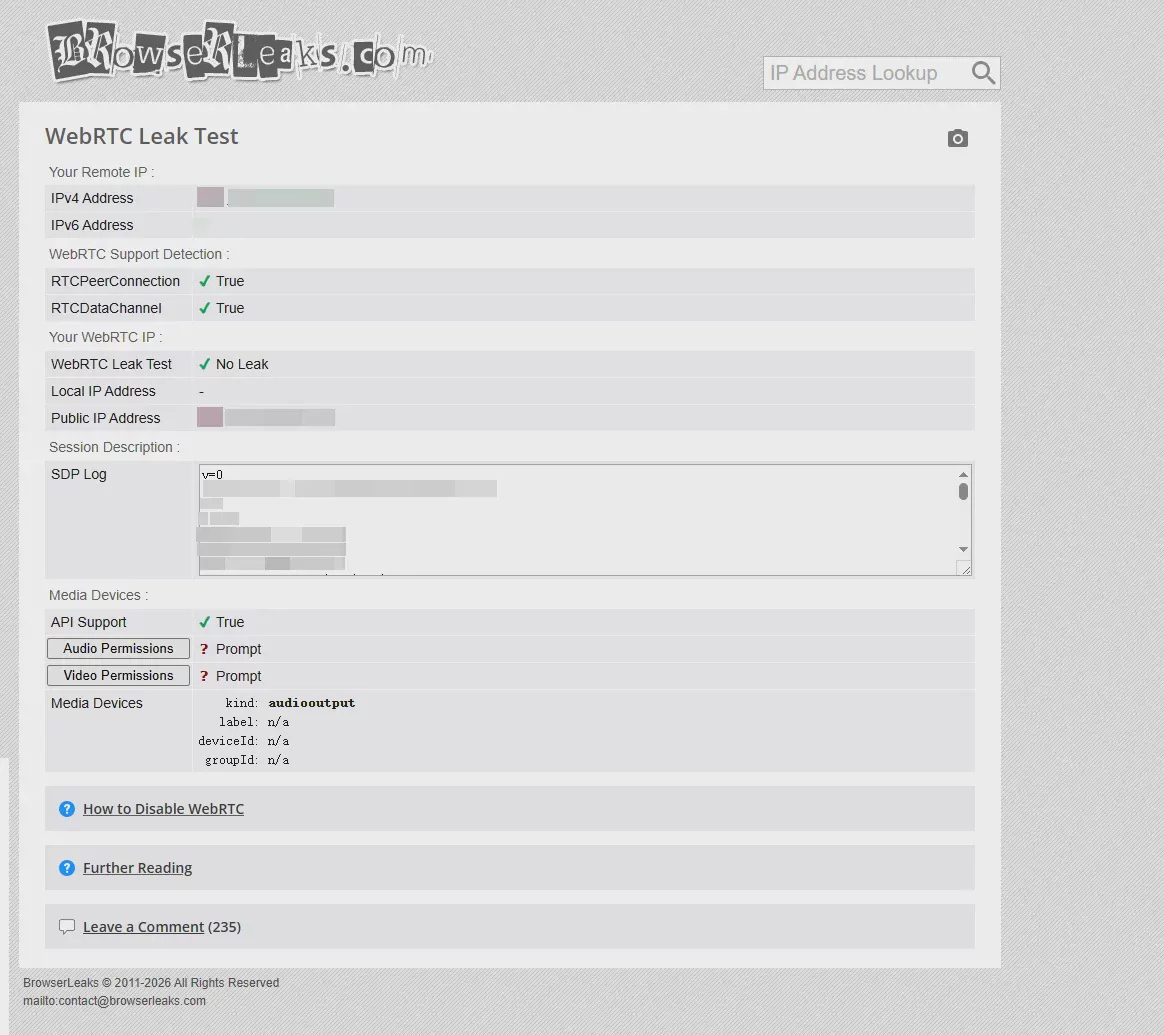
During testing, focus on:
- Whether the real IP address appears;
- Whether the DNS server location is abnormal;
- Whether the browser environment matches the proxy region.
For users who need to operate multiple accounts, detecting the proxy IP alone is not enough; they also need to ensure that the browser environment does not leak real network information.
Step four: Test proxy stability
In addition to IP information and risk records, you also need to test long-term stability. Focus on:
- Connection success rate;
- Network latency;
- Whether the IP changes frequently;
- Whether it remains stable during long-term operation.
Many proxies test fast the first time, but during long-term operation they frequently disconnect or change exit IPs. For account operation scenarios, stability is usually more important than raw speed alone.
IV. How to Choose Proxy IPs for Different Business Scenarios?
Different businesses have different requirements for proxy IPs.
Amazon cross-border e-commerce accounts
Amazon account operation focuses more on:
- Stable IP region;
- Consistent login environment;
- Matching browser environment.
For example: a US-site account uses a US proxy environment over the long term; a European-site account maintains the network environment of its corresponding country. If an account frequently logs in from different countries or switches between different network environments, it may increase the probability that the platform will require re-verification.
Overseas content operations such as YouTube and TikTok
Content teams usually need to manage multiple accounts. For example: testing channels in different countries, running different content directions, and analyzing data for different accounts. In such scenarios, greater attention is paid to:
- IP stability;
- Regional authenticity;
- Multi-account environment isolation.
Advertising testing and market analysis
Advertising teams usually need to simulate user environments in different regions. Key focus areas:
- IP coverage;
- Regional accuracy;
- Data access stability.
Five. Why is account environment management still necessary after proxy IP detection?
After completing proxy detection, many users believe:
"Find a clean IP, and you can operate accounts safely."
But in reality, IP is only one factor in the account environment. Overseas platforms typically make comprehensive assessments based on:
- IP address;
- Browser fingerprint;
- Device information;
- Cookie data;
- System language;
- Time zone settings.
In other words:
Proxy IPs solve network environment issues, while fingerprint browsers solve complete browsing environment issues.
If multiple accounts share the same browser environment, even if different proxies are used, there may still be an issue of environment information being linked.
VI. How does P1 help manage proxy IPs and account environments?
When a team operates multiple overseas accounts, it usually needs to create independent environments for different accounts.
For example:
- US Amazon accounts use US proxy IPs;
- European YouTube accounts use European regional networks;
- Accounts for different brands conduct market tests separately.
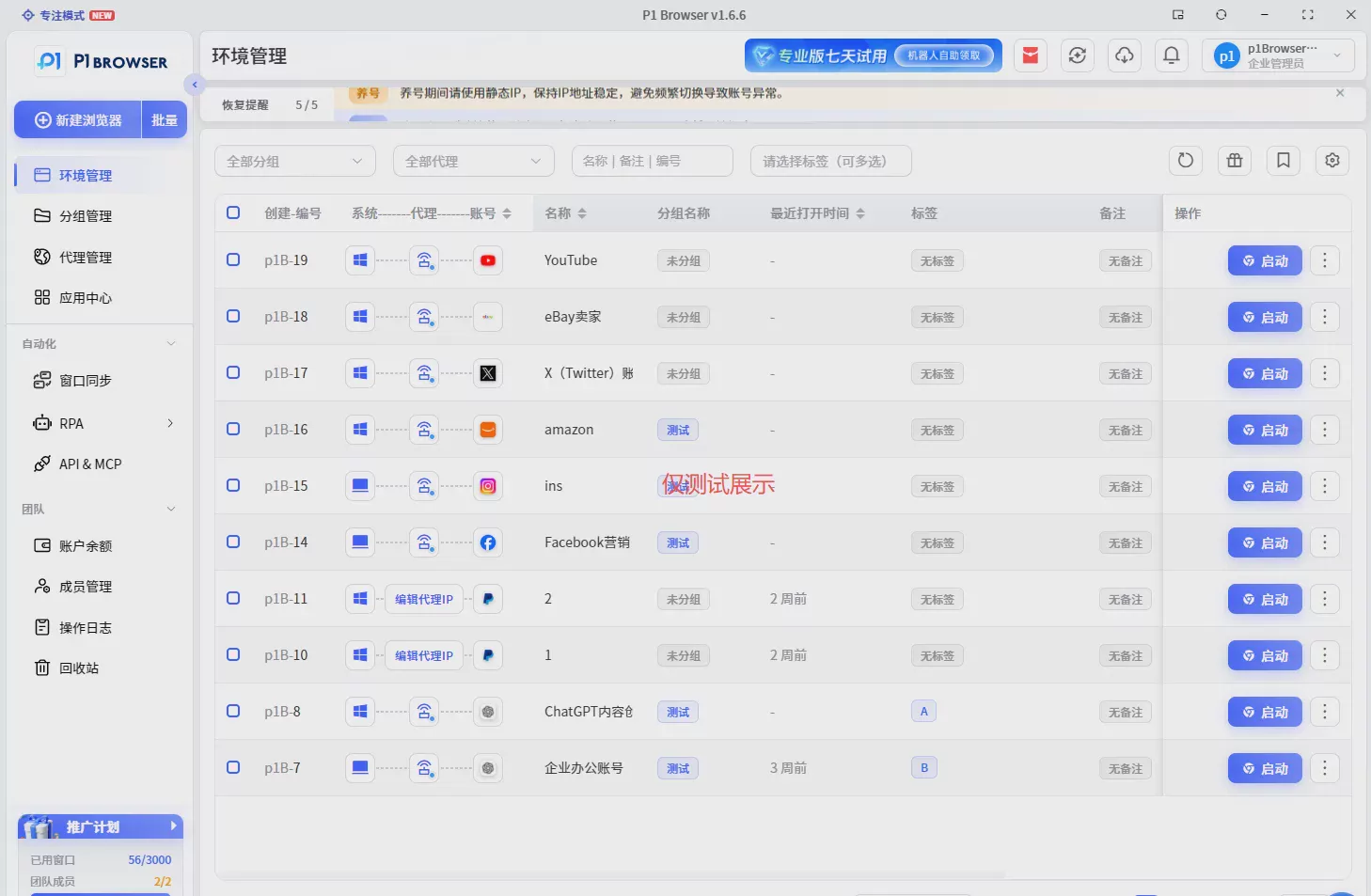
P1 fingerprint browsercan help users create independent browsing environments and manage:
Environment Isolation
Each browser window has its own independent Cookie, local storage, and configuration profiles, which are not shared with one another, blocking the risk of account environment association at the foundational level.
Proxy and Fingerprint Configuration
Supports binding an independent proxy IP to each environment and visually configuring browser fingerprint parameters such as language, time zone, and resolution to ensure the network environment and browser environment remain consistent.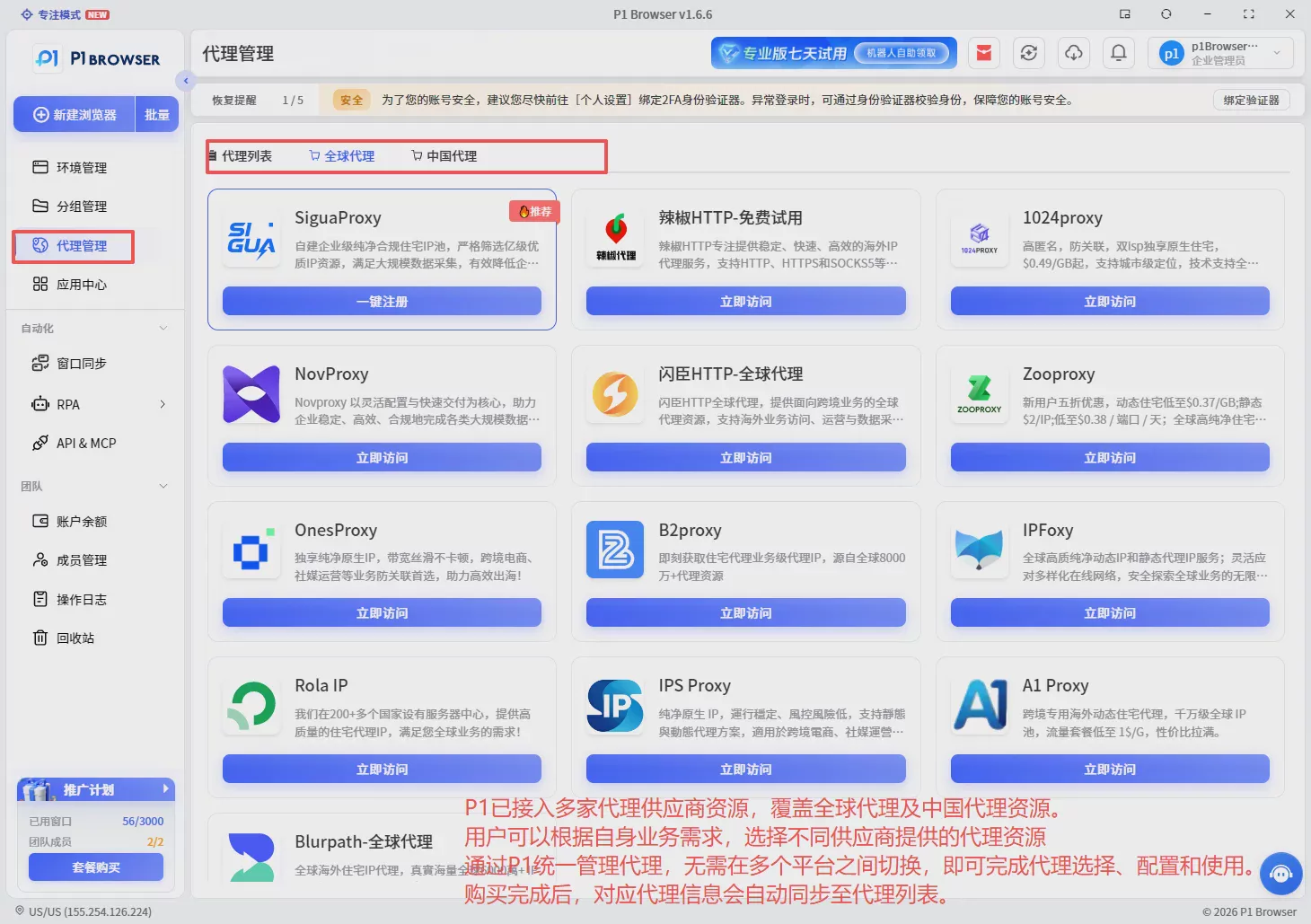
Team Collaboration
Built-in member grouping and hierarchical permission management support sharing of environment profiles and resources. Operations staff focus on content, while administrators centrally manage account permissions.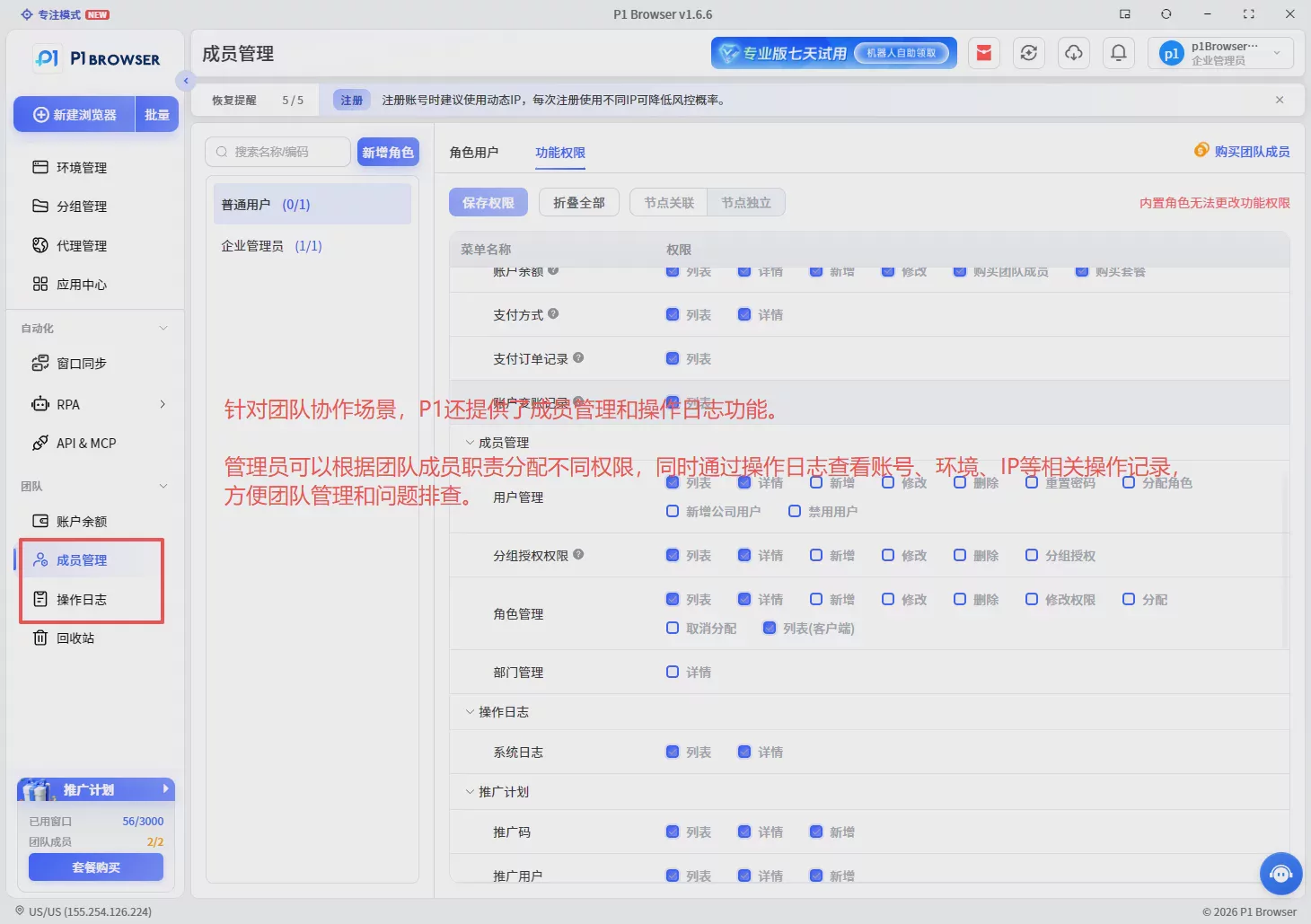
This creates a complete operations workflow:
Seven. Summary: Proxy IP quality determines the stability of account operations
The quality of a proxy IP is not acceptable simply because it "can connect." A proxy truly suitable for overseas business operations must simultaneously meet the following:
- the IP information is authentic;
- the risk records are normal;
- the network environment is stable;
- it matches the business scenario.
For overseas account operation teams on Amazon, YouTube, TikTok, and other platforms, proxy IPs are only the foundation. To achieve long-term stable operations, teams also need to incorporate independent browser environment management.
By detecting proxy quality in advance and using the P1 fingerprint browser to manage different account environments, teams can build a more stable and secure overseas operations system.
If you also operate multiple overseas platform accounts and need to configure an independent, stable browsing environment for each account, visit the official P1 Fingerprint Browser website (www.p1go.com) to learn more.
Try P1 for free